 Buy
Buy Rent
Rent Sell
Sell New
New Prices




Your voice is the report.
Speak in the loft; it lands in D2. Every sentence you dictate on-site is transcribed, routed to the correct RICS field with a condition rating inferred and a 0–1 confidence score attached — and the audio stays replayable against every field, for as long as you need it.
The transcription tape
Scroll to press play.
Keep scrolling — the tape plays, the transcript types itself, and the router files each observation as it recognises it. An illustrative walk-through of one dictation session.
Live transcript · speech recognition
Moving to the rear roof slope — three slipped slates beside the chimney, and the lead flashing lifting at the abutment.
Consumer unit in the hallway, older plastic casing, no RCD protection visible — recommend an electrical test.
Slight tide marking to the base of the north gable wall, likely historic — recommend a damp specialist confirms.
Routed as it's recognised
How it works
Five steps from microphone to RICS field.
Everything after the record button runs server-side. You can close the browser after uploading — you're notified when your field updates are ready to review.
Record, upload or paste
Three ways in, all equal. Record live through the browser microphone in the dictation panel; upload an audio file from your phone's voice recorder or a digital Dictaphone (MP3, MP4, M4A, WAV, WebM and OGG are all accepted); or paste typed site notes if shorthand-on-a-phone is your on-site method. No app to install, no Bluetooth pairing. No coverage in the basement? Record offline and upload from the drive home.
Speech recognition transcribes
The audio becomes a full text transcript, stored against your dictation session and shown in the panel so you can verify it before routing. UK and international English accents are handled reliably; if wind or site noise garbles a word, you edit the transcript text and re-route that sentence — no need to re-record the session. There's no required dictation order: talk through the property the way you actually walk it.
The router reads every sentence
This is the step generic dictation apps don't have. The routing AI maps each sentence to the correct RICS field — D2 Roof Coverings, F1 Electricity, B priority items — infers a condition rating from your description (say "showing early signs of decay" and it rates the element; you never say "rating two"), and attaches a 0–1 confidence score. Your firm's standard phrases and style profile are injected as routing context on every call, so the output reads like your firm from the first draft. Live labels — "Reviewing roof structure", "Reviewing electrical systems" — stream from the AI's work as it goes.
Otto auto-mode
‘The slate roof is in fair condition with a few slipped slates at the rear, gutters are sagging on the left elevation.’
You review by confidence, not line by line
Each field update shows the routed field, the expanded text, the inferred rating, the confidence score and a link back to the audio at that exact moment. Routes above roughly 0.85 typically need no attention; anything below is flagged for review. Accept, edit, move to a different field, or delete — the AI never writes to the report without your sign-off. Misrouted a field? Re-dictate just that one; the new session replaces the old route for that field only.
It lands in the editor — and the toolkit takes over
Accepted routes populate the Level 2 or Level 3 report editor immediately. From there, run Otto auto-mode for a full first-pass report, categorise photos with Image AI, and check compliance with the RICS Standards Check before you export the branded PDF.
What the pipeline does
Messy audio in. Searchable record out.
Real site dictation is full of ums, half-sentences and wind. The pipeline is built for that — whatever device and format you record on.
“…uh, right — so, flat roof over the bay, er… cracking at the, at the abutment…”
Flat roof over the bay cracking at the abutment; recommend further investigation.
From rambling to record
The transcript strips the "uh, right, so—" but keeps every observation, punctuated and searchable. Search for "abutment" months later and jump straight to the sentence — then hit play to hear the moment you said it. Every sentence stays individually editable and re-routable.
Every format, one pipeline
Phone voice memo, digital Dictaphone file, browser microphone or typed notes — they all enter the same server-side pipeline and come out as routed field updates. Typed input is treated identically to voice: field mapping, rating inference and confidence scoring all apply.
The quiet workflow
Say it once, where you see it.
The observation is sharpest in the moment you make it — eyes on the ceiling corner, torch on the tide mark. Dictation captures it there, so nothing survives on memory alone.

1 · In the room
Speak it as you spot it
Phone close to your mouth, eyes on the element. Room by room, no set order — the router works out where every sentence belongs.

2 · In the car
Upload from the kerb
Phone memo or Dictaphone file — drop it into the panel before you pull away. Transcription and routing run server-side while you drive.

3 · At the desk
Review, don't retype
Your words are already in the right fields. Check the flagged routes, replay anything you want to hear again, and move on to judgement — not typing.
Coverage
Every element field, reachable by voice.
The router knows the full element structure of both Level 2 and Level 3 reports. Mention a chimney, a consumer unit or a party wall — it recognises the element and routes to the correct field. All 32 fields are reachable in a single session.
Section D — External
- D1Chimney stacks
- D2Roof coverings
- D3Rainwater pipes & gutters
- D4Main walls
- D5Windows
- D6Outside doors
- D7Conservatory & porches
- D8Other joinery & finishes
- D9Other external
Section E — Internal
- E1Roof structure
- E2Ceilings
- E3Walls & partitions
- E4Floors
- E5Fireplaces & chimney breasts
- E6Built-in fittings
- E7Woodwork
- E8Bathroom fittings
- E9Other internal
Section F — Services
- F1Electricity
- F2Gas & oil
- F3Water supply
- F4Heating
- F5Water heating
- F6Drainage
- F7Common services
Section G — Grounds
- G1Garage
- G2Outbuildings
- G3Other grounds
Section B — Summary
- ■Overall summary
- ■Priority items
- ■Condition summary
Rating inference
Condition ratings C1, C2 and C3 are inferred from how you describe the element — "showing early signs of decay" is enough. Anything below the confidence threshold is flagged for your review.
Custom scales
Firm uses a 1–5 scale or bespoke labels? A keyword-generation step analyses each rating's description and rebuilds the routing prompt dynamically, so the inferred rating uses your terminology.
Want the full section structure? See the Level 2 report writer or the Level 3 report writer.
Professional indemnity
Your voice is the evidence.
PI challenges arrive long after the survey is delivered. Every observation you dictate creates a layered record that survives the gap: the audio file, the exact transcript sentence, the field it was routed to, the rating inferred and the confidence score you reviewed before accepting. A contemporaneous record of your on-site judgement — in your own voice.
- ●Replayable per element: click D2 Roof Coverings and hear exactly what you said at that moment of the inspection — your actual words, timestamped, not a reconstructed note.
- ●Proposal and decision kept separate: the AI's route and your sign-off are distinct, dated records. If you changed a route or overrode a rating, that change is visible.
- ●You control retention: sessions are stored in secure cloud storage under your account. Delete any time; most surveyors keep session audio for the duration of their PI cover period.
- ●Never training data: audio is processed solely to deliver transcription and routing. It is never used to train AI models and is never shared outside your account.
A PI challenge, replayed
Six months after delivery
A client disputes the condition rating on D4 Main Walls. They claim no dampness was noted at inspection.
Your response
Open the dictation panel, locate the D4 session, press play. Your on-site observation — "slight tide marking visible to base of north gable, condition rating 2, recommend specialist investigation" — plays back in your voice, from the day of inspection.
The record
D4 Main Walls — Condition 2, confidence 0.91, accepted by you on the date of inspection. A contemporaneous audit trail, stored and replayable.
Pairs with the RICS Standards Check — a compliance pass on the written report before you sign off.
Who it's built for
Dictaphone die-hards, phone recorders, typists — all supported.
Nobody has to change how they capture on-site. The pipeline meets your habit where it is.
The Dictaphone die-hard
Twenty years of handheld recorders and no intention of stopping. Keep the workflow: record the walk-through as normal, transfer the file, upload. Olympus, Sony and Philips recorders exporting MP3, WAV or M4A all work — no pairing, no app.
Exports WMA? Convert to MP3 with a free converter first.
The phone recorder
A phone is lighter than a laptop and a Dictaphone combined. Record live through the browser microphone in the panel, or use the built-in voice-memo app offline and upload from the car — both route identically. Most surveyors' default.
In noisy conditions, an earphone mic close to your mouth noticeably lifts accuracy.
The typist
Shorthand notes on a phone or tablet as you walk? Paste them straight into the panel. Typed input is treated identically to a voice transcript — field mapping, rating inference and confidence scoring all apply. Mix modes freely: a short recording plus typed additions merge into the same report.
Sessions accumulate — new ones merge without overwriting earlier routes.
Processing time
Dictate twice as much. Wait the same.
Transcription and routing typically complete within one to three minutes for recordings up to an hour — processing barely grows with recording length. Bars share one linear scale (60 min = full width).
How it compares
Transcription is table stakes. Routing is the tool.
Any modern app can turn speech into text. The difference is what happens to the text once the recorder stops.
| Capability | AI Dictation | Typing at the desk |
|---|---|---|
| Speech-to-text transcription | Yes — server-side | — |
| Routes sentences to RICS fields (D1–G3, B) | Automatic | By hand |
| Condition rating inferred (C1/C2/C3 or custom) | Yes | By hand |
| Confidence score per route (0–1) | Yes | No |
| Audio replayable against each individual field | Yes | No audio |
| Firm style profile & standard phrases injected | Every call | From memory |
| Voice commands for editor actions | Yes | — |
| Embedded inside the RICS report editor | Built in | You are the editor |
| Offline capture, upload later | Yes | — |
See the full surveyor toolkit, or explore the Snagging Report Builder and Property Data Drawer.
Two modes, one engine
A single field — or the whole report.
Both modes share the same routing engine. The difference is scope: manual dictation targets fields one session at a time; Otto auto-mode routes the entire transcript in one pass.
Manual dictation
- –Runs on the secondary AI engine, optimised for targeted additions to an existing report
- –Use for supplementing a partly-complete report, re-dictating individual fields, or adding notes after the survey
- –Sessions accumulate — each new one merges without overwriting earlier routes
- –Hide or unhide old sessions without losing the audit trail
Otto auto-mode
- –Runs on the frontier AI engine with careful deliberation across the full report — automatic fallback to the secondary engine if the primary is unavailable
- –Use when you have a full on-site transcript and want every RICS section populated in one pass
- –Live labels show which section the AI is reviewing — "Reviewing roof structure", "Reviewing electrical systems"
- –Section B, C, H and I auto-population runs on top of your routed dictation
Both modes are free with a verified Home.co.uk surveyor account, and both inject your standard phrases and style profile automatically.
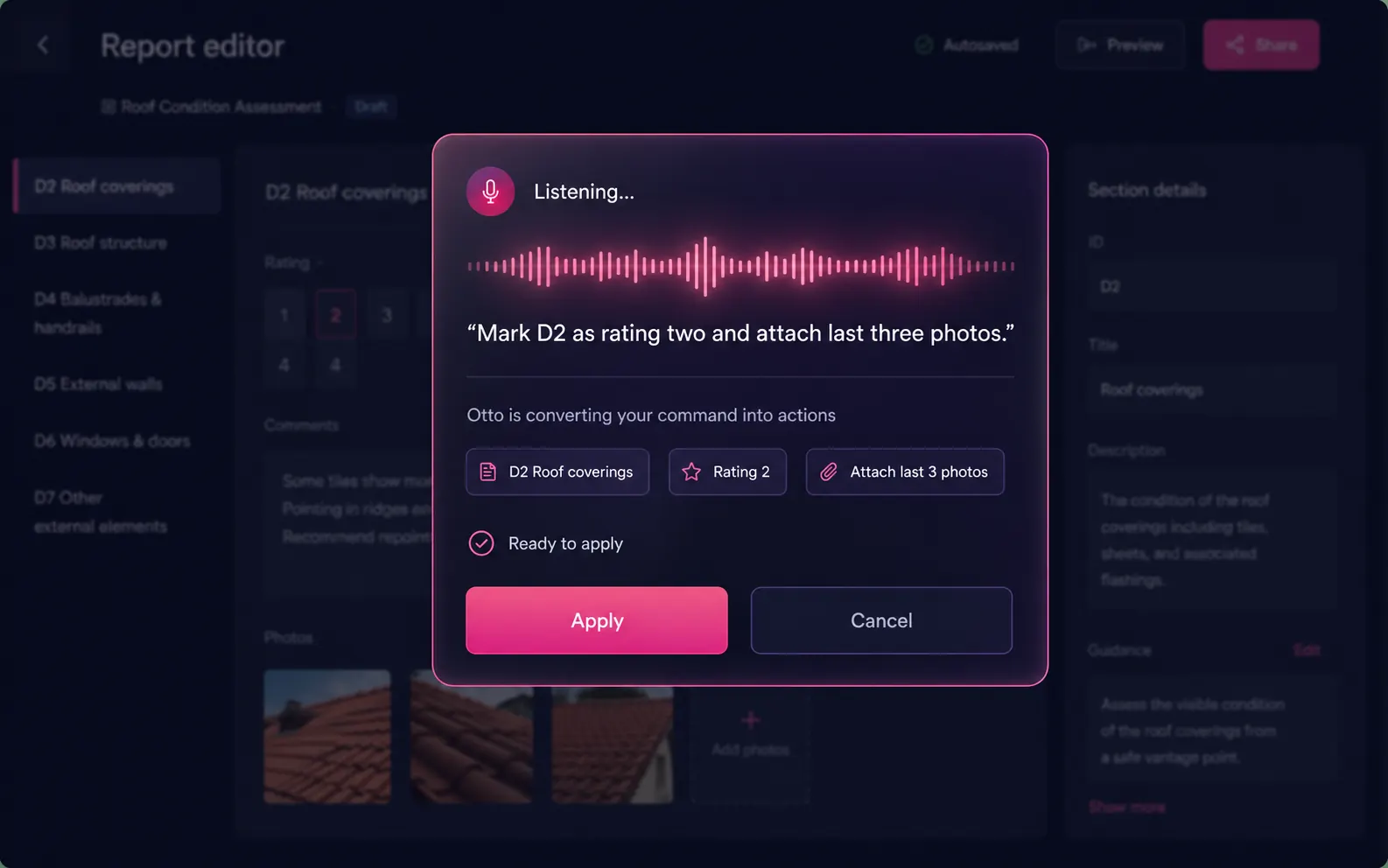
Voice commands
Speak the action. The editor runs it.
Dictation isn't only for content. Hold the mic in the editor and issue a command — "mark D2 as rating two and attach the last three photos" — and it parses your sentence into editor actions. Hands-free editing while you walk back to the car.
- ●Element targeting — "go to F1", "open Section H"
- ●Rating updates — "mark this rating three"
- ●Photo attachment — "attach last three photos to D2"
- ●Always confirms before applying — no surprise edits
The same voice-first approach runs across your whole account — meet Inigo, the assistant available everywhere you work.
Under the bonnet
The dictation spec sheet

Part of the toolkit
Dictation is the front door to the whole report workflow.
Your routed observations feed the tools below — and the tools below make your routing sharper.
Otto — AI Report Writer
The auto-mode engine that takes your full dictation transcript and produces a finished, editable Level 2 or Level 3 report in 5–15 minutes. Dictation is Otto's first step — this page is the deep-dive on it.
AI Training
Upload past reports and the routing engine learns your firm's phrasing directly from the documents — so dictated observations come back in language your firm already signs off.
Standard Phrases
Your pre-approved element descriptions and defect wording, injected as routing context on every dictation call. The router picks the matching phrase instead of inventing generic survey-speak.
Firm Style Profile
A writing fingerprint extracted from your past reports and applied on every routing run — so every surveyor on the team dictates in their own voice but reports in the firm's.
Inigo Assistant
The voice-first assistant across your whole account. The same speak-it-don't-click-it philosophy as dictation, applied everywhere you work.
Image AI
While your voice fills the text fields, vision AI categorises your inspection photos to the same D–G elements — the two halves of the on-site capture story.
Getting started
First session, four steps.
No configuration required. AI Dictation is included with every verified Home.co.uk surveyor listing — no separate subscription.
Open a report
From your surveyor account, open a Level 2 or Level 3 report — or start Otto auto-mode for a fresh instruction. The dictation panel is reachable from any report.
Record or upload
Tap the microphone to record live through the browser, upload a file recorded offline, or paste typed site notes — whichever matches how you work on-site.
Review routed fields
Each observation lands in its RICS field with an inferred rating and a 0–1 confidence score. Accept the confident routes in one tap; give the flagged ones your attention.
Deliver
Routed observations populate the editor immediately. Add commentary, run the RICS Standards Check, and export a branded PDF — same day as the inspection.
FAQ
Common questions about AI Dictation
Recording & formats
Can I dictate on-site without internet?
Record audio offline on your phone, then upload when you're back in coverage. Transcription and routing both run server-side once the audio is uploaded — you don't need to be on-site or online during processing.
What audio file formats does the upload support?
Most common audio and video formats are accepted — including MP3, MP4, M4A, WAV, WebM and OGG. If you record on a standard smartphone voice recorder or a dictaphone, the output format is almost certainly supported. You can also use the built-in browser microphone directly in the dictation panel without recording a file at all.
Can I use AI Dictation on a mobile phone on-site?
Yes. The dictation panel works in any modern mobile browser — no dedicated app required. You can record directly through the browser microphone, or use your phone's built-in voice recorder and upload the file when you're done. Most surveyors either record live through the browser on-site, or record offline with their phone's default voice app and upload the file on the drive home. Both workflows route identically — the transcript, routing and confidence scores are all produced from the uploaded audio.
How does AI Dictation handle background noise during on-site recording?
Speech recognition is optimised for real-world environments. Wind, traffic and ambient site noise are common and handled well. If specific words are garbled by noise, the transcript displays those segments clearly so you can correct them before routing. The most effective measure is positioning the microphone closer to your mouth — an earphone with a built-in mic significantly improves accuracy in noisy conditions. If a segment transcribes poorly, you can edit the transcript text directly and re-route that sentence without re-recording the whole session.
Does it support regional accents?
Yes. The speech recognition handles a wide range of UK and international English accents reliably. If a word transcribes incorrectly, you can edit the transcript and re-route that sentence, or correct the text directly in the report editor.
Routing & accuracy
How does AI Dictation differ from generic dictation apps?
Generic dictation tools transcribe speech to text and stop there. AI Dictation goes further: speech recognition transcribes, then the routing AI maps every sentence to the correct RICS field (D2 Roof Coverings, F1 Electricity, B priority items), infers a condition rating, attaches a 0–1 confidence score and stores the audio so you can replay it for any field if questioned months later.
How accurate is the RICS field routing?
Accuracy depends on transcription clarity and how specifically you refer to building elements. Every route has a 0–1 confidence score: high-confidence routes (above roughly 0.85) typically need no review; low-confidence routes are flagged. Injecting your style profile and standard phrases consistently raises accuracy by giving the AI firm-specific vocabulary to match against.
What if I dictate something that doesn't map to a RICS field?
The AI flags low-confidence routes rather than silently absorbing unmatched content. You can move the text to a different field, attach it to a general section (B, C), or delete it. Nothing is automatically written to the report without your approval.
How does custom condition rating support work?
If your firm uses a scale other than C1/C2/C3 — for example a 1–5 numeric scale or bespoke labels — you configure rating options in firm settings. AI Dictation runs a keyword-generation step that analyses each rating's description and produces synonyms, phrases and context hints, then rebuilds the routing prompt dynamically so the AI infers the correct custom rating from your spoken observations.
What should I look for when choosing AI dictation software for RICS surveys?
Five things matter most. First: RICS-native field mapping — the software should know that describing a chimney means D1, not just transcribe the word. Second: condition rating inference, so you don't have to say "rating two" explicitly. Third: replayable audio per field for your PI audit trail, not just a single unlinked recording. Fourth: style profile and standard phrases injection so every report sounds like your firm rather than generic survey-speak. Fifth: a confidence scoring system so you focus review time on uncertain routes rather than re-reading every line. AI Dictation on Home.co.uk provides all five as standard, embedded directly inside the RICS report editor.
PI, storage & data
How does AI Dictation help with professional indemnity protection?
Every observation you dictate creates a layered record: the audio file, the transcript sentence, the RICS field it was routed to, the condition rating inferred and the confidence score you reviewed. Months after a survey is delivered — when a PI challenge arrives — open the dictation panel, locate the relevant element and play back exactly what you said during the inspection. The record shows the AI's routing proposal separately from your sign-off, so you can demonstrate that every condition rating reflected your professional judgement. Most surveyors retain session audio for the duration of their PI cover period.
Where is my audio stored, and can I delete it?
Audio files, transcripts and routed field updates are stored in secure cloud storage under your Home.co.uk surveyor account. You control retention: delete any dictation session from the panel to remove the audio and transcript permanently. Your survey content is used solely to deliver the routing service — it is never used to train AI models. Full data-handling details are in your account Data Processing Agreement.
Is AI Dictation GDPR compliant? Who can access my audio recordings?
Yes. All audio files, transcripts and routed field updates are stored in secure cloud storage under your Home.co.uk surveyor account. No third party has access to your survey content. Audio is processed solely to deliver transcription and RICS field routing — it is never used to train AI models. You control retention: delete any dictation session from the panel at any time to remove the audio and transcript permanently. Your survey data is never shared outside your account. Full data-handling details, including your rights as a data subject, are in your account Data Processing Agreement.
How long does transcription take after I upload my recording?
Transcription and field routing typically complete within one to three minutes for a standard on-site recording of up to one hour. You can close the browser after uploading — you will be notified when routing is complete and your field updates are ready to review. For very long recordings over 90 minutes, splitting into two sessions before uploading can reduce processing time and also creates a more granular per-session audit trail for PI purposes.
Modes, levels & the toolkit
Does AI Dictation work standalone, or only inside Otto?
Both. In manual mode you use it directly inside the Level 2 or Level 3 editor to add observations to specific fields one session at a time. In Otto auto-mode the whole transcript is routed at once, populating all report sections in a single pass. The two modes share the same underlying routing engine.
Can AI Dictation be used for a RICS Level 3 Building Survey?
Yes. The routing engine uses the same D–G element structure for both Level 2 and Level 3 reports. When you dictate into a Level 3 report, each observation is still routed to D1–D9, E1–E9, F1–F7 and G1–G3 in the same way. The Level 3 editor then provides the deeper commentary fields for each element — so your dictation populates the same field targets, and you expand the detail in the editor rather than re-dictating.
Does AI Dictation work with typed notes, or only voice recordings?
Both. You can paste typed site notes directly into the dictation panel and route them exactly as you would a voice transcript. This is useful if you already use a shorthand note system on-site, or if you want to combine a brief voice recording with additional typed observations made after the survey. The routing AI treats typed input identically to a voice transcript — RICS field mapping, condition rating inference and confidence scoring all apply.
Can I use AI Dictation for a snagging survey or new-build defect list?
AI Dictation is purpose-built for the RICS Home Survey Standard element structure used in Level 2 and Level 3 reports, but surveyors also use it to capture defect observations on new-build inspections. For structured new-build snagging — with a defect list by room, severity categories and client-facing output — the dedicated snagging report tool is the better starting point. The two tools complement each other: dictate your on-site observations quickly with AI Dictation, then use the snagging tool for the structured defect list presentation.
How does AI Dictation connect with the property data and comparable sales tools?
AI Dictation populates the condition and commentary sections of a RICS report from your on-site observations. Once routing is complete, the other tools in your Home.co.uk surveyor account add supporting data: the property data tool pulls the EPC rating, floor area, UPRN, flood risk zone and planning history for the inspected address; the comparable sales tool finds similar settled sales within your chosen radius. All three tools share the same report — no need to re-enter the address or switch between systems.
More tools
Explore the rest of the surveyor toolkit

Home Academy
Short lessons on Home tools
Learn the steps, try the real tools and follow a first-week path to your first Otto report.

Otto
AI auto-mode RICS report writer
Dictate on-site, upload photos, get a finished, fully-routed Level 2 or Level 3 report in minutes.

Level 2 Report Writer
RICS Home Survey Level 2
Field-by-field RICS Level 2 reports with inline AI suggestions, image gallery, comparables and one-click branded PDF.

Level 3 Report Writer
RICS Building Survey Level 3
Comprehensive Level 3 Building Survey reports with deep technical sections, custom rating scales and AI legal-adviser notes.

Surveyor Comparable Tool
Sold + rental comps in one click
Auto-fetch sold and rental comparables within a 1-mile radius, weighted valuation range, branded PDF appendix for any survey.
Snagging Report Builder
New-build defect tracker
Build professional new-build snagging lists with location-based defect tracking, photos, urgency, status and PDF export.

Schedule of Condition
Room by room, photo by photo
A dated record of a property's condition, every elevation and every room, dictated on site with numbered photos referenced for you and a branded PDF. No ratings, no advice.

Image AI
Auto-categorise survey photos
Upload up to 200 photos; vision AI tags each to the right RICS element, rates condition, extracts defects and picks the best 35 for the report.
Style Profile
Your firm's writing fingerprint
Teach the AI to write like your firm — upload past reports, the AI extracts a 25-dimension writing fingerprint and applies it to every future auto-mode report.

Property Viewer
Pre-survey property intelligence
Look up any UK property and instantly see EPC, energy renovation costs, broadband coverage, environmental risks (flood, radon, mining, landfill), invasive plants, sales history and listing status — all in one dashboard.

Property Data Drawer
EPC + risks + comps in one panel
Open the property data drawer in any report to see EPC, environmental risks, listing history and comparables — copy-paste ready.

Standard Phrases
Reusable language library
Personal, firm-wide and industry-preset phrase libraries — insert with one click and use to train AI routing for voice consistency.

RICS Standards Check
A Home Survey Standard check before you sign
One-click AI check against the RICS Home Survey Standard — flags missing content, weak ratings and structural gaps before you sign the report.

Quote Builder
Clear choices, a date to decide
Send branded survey quotes with up to three options, a PDF and an expiry date. Reuse service templates, track responses and see your win rate.

Home Payments
Paid faster, no invoicing
Home Payments mission control — customers pay at booking through a Stripe-verified checkout, payouts land on a schedule you can see, payment links cover your private work, and there is no invoice chasing ever again.

Bookings CRM
Every job, one pipeline
The surveyor CRM built into the platform — Homemove jobs land pre-paid with customer and property attached, enquiries convert to bookings, and the whole pipeline runs from one screen.

Panel work
Every panel job, every deadline
Run jobs from the other panels you work for beside your own. List each panel with its usual fee and turnaround, add a job in under a minute, and watch every report deadline count down.

Calendars & Requests
A diary that fills itself
Per-surveyor diaries with live availability — keep your dates current and we book real jobs straight in, with inbound availability requests answered in a tap.

The firm inbox that knows the job
A full mail client scoped to your firm — @home.uk purpose mailboxes and per-user addresses, with every thread landing against the booking it belongs to.

Documents & e-sign
Signed before you set foot on site
Terms of engagement sent with the booking, tracked from sent to signed, chased automatically and stored against the job — no more chasing clients to sign.

Insurance & conflict checks
Safe to take the job
Every new job is checked against your firm's own history, so you know when you have surveyed a property before. Your PI insurance is tracked with reminders, and new reports can't be issued once recorded cover has lapsed.

Telephony
The firm number that never misses a job
A phone system built into the platform — take calls in the browser, forward to mobiles, ring the whole team at once, and keep a shared call log with optional recording.

Customer portal
Your client, never in the dark
A white-label portal under your firm's branding and domain — booking status, reminders and secure report delivery, so customers stop asking where things are.

Website builder
Built by asking, not designing
A firm website built and edited by talking to Inigo — brand and theme sync, a real section library, custom domains via CNAME, and enquiries that land in your pipeline.

Campaigns
Win the next job from the last one
Firm email campaigns with per-recipient tracking — sends, opens, clicks and read time — built on consented lists with one-click unsubscribe handled for you.

Reviews & badges
Proof that wins the next booking
Reviews earned on real completed jobs — scored by the homemover, shown on your directory profile — plus embeddable trust badges that carry the proof to your own website.

Performance
See the pipeline, beat the clock
Firm analytics without the spreadsheets — pipeline conversion, team performance and your own turnaround speed, the fourth lever of your rate.

Inigo
The AI assistant for surveyors
Ask in chat, dictate by voice, or click any element for contextual help — grounded answers on valuations, sales history and market data, inside the platform.

AI Training
Teach it your standard
Upload past reports and press Train — the AI learns your firm's defect language, ratings philosophy and phrasing, and Otto writes with it on every job.

Environmental Report
Every risk, one report
A one-click environmental risk report for any property — flood, ground stability, environmental factors and planning constraints, delivered as a PDF.
Free directory listing. Pay-as-you-go toolkit.
Every RICS-regulated surveying firm gets a verified profile, direct bookings from home.co.uk consumers and the surveyor toolkit included with the account. No subscription. No pay-per-lead. No commission on the job. Pay only when you use the premium AI tools.
2 minute setup · Verified against the RICS register · Trusted UK property platform since 1995